You throw. Your phone keeps score.
Put your phone in front of the board: it spots every dart and keeps the score. With friends, or online against a friend at home. No hardware, no subscription.
- Free
- iPhone and Android
- Works offline
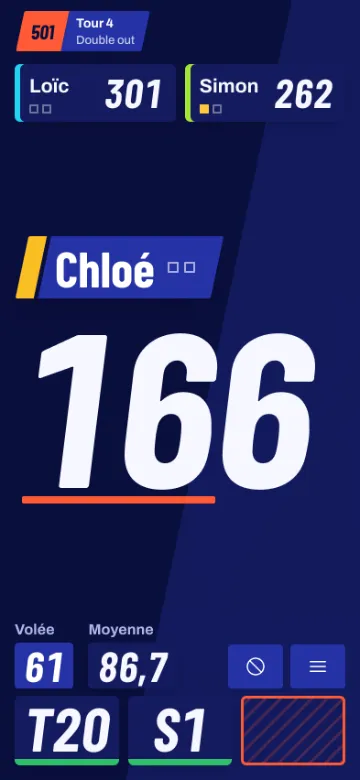
Three steps and you're playing
- Set the phone downOn a stand, from the side, 1.5 to 2 m from the board. It has to see the whole board.
- It finds the board itselfIn a few seconds. Nothing to set up.
- ThrowEvery dart is scored as soon as it lands. Wrong call? One tap to fix it. Pull your darts and the next turn starts.
And with friends? The whole crew on one phone, or a friend at home, online. Play together
Together, here or online
Throw doesn't just count your darts: the crew around the board, teams, and the friend playing from home.
- A friend, each at homeEach at their own board with their phone: the game live, and a picture of their board at every dart.
- Challenge a friendPick the game and its rules: your challenge reaches your friends, even with the app closed.
- Up to 8 on one phoneThe whole crew around the same board, each for themselves or in teams: the phone knows whose turn it is.
- The big screenThe score shown big on the living room TV or the pub screen.
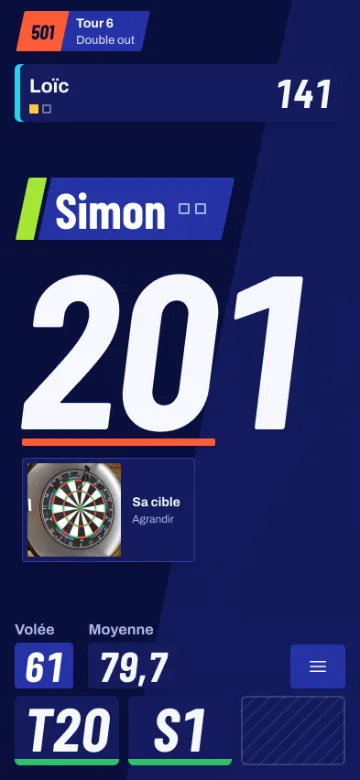
Four games and their variants
From 501 double out to Halve It and its secret bonuses, solo, with friends or in teams.
- 501 (x01)Count down from 501 to exactly zero, finishing on a double.Read the rules →
- CricketClose 15 to 20 and the bull before everyone else.Read the rules →
- ShanghaiOne number per round, and a Shanghai to win it all at once.Read the rules →
- Halve ItHit each round's target or watch your score get cut in half.Read the rules →
Everything runs on your phone
- Nothing to buyNo box, no special camera, no subscription. Your phone is enough.
- OfflineOnce installed, the app works without a network, in the garage or at the back of the pub.
- Your images stay with youScoring is computed on the phone, no image is sent anywhere to count your darts.
- Reliable, and honest about itOn our test sessions, about 9 darts out of 10 land in the same segment as with a 3-camera system. For the rest, one tap is enough.

Install the app
Throw installs from your browser, no app store needed.
iPhone
- Open throw.maz-ui.com in Safari.
- Tap "···" then "Share" (iOS 18: Share in the bottom bar directly).
- Choose "Add to Home Screen", then "Add".
Android
- Open throw.maz-ui.com in Chrome.
- Tap "Install app" (or the ⋮ menu, then Install).
- Start Throw from your home screen.
FAQ
Which dartboards?
Traditional steel-tip boards (bristle), standard size. Electronic boards already keep the score themselves.
Which phone?
A recent iPhone or Android phone. The phone test in the app tells you in 10 seconds whether yours can handle it.
Can I play a friend online?
Yes. Each at their own board with their phone, and you see a picture of their board at every dart. With a free account you challenge your friends; without one, a game is shared with a link (beta).
How many players?
Up to 8 players on one phone, each for themselves or in teams. Online, it's one on one for now.
Can I show it on the TV?
Open throw.maz-ui.com/app/screen on the TV or a computer, and type its code on your phone. Your games show up there in large.
What if a dart is scored wrong?
Tap the dart on screen and pick the right value. A bounce-out is logged as "Bounce" or "Miss" in one tap.
Does it cost anything?
No. Throw is a personal project, free and ad-free.
Do I need an account?
No. A free account keeps your stats on all your devices and unlocks friends. Online without an account (beta), a first name is enough.
Your board is waiting.
Open the app, set your phone down, throw.